Do you import goods from China, Turkey, Europe, South Korea, the UAE, or other countries?
Manually transferring data from KEDEN into 1C takes time, requires constant checking, and increases the risk of errors.
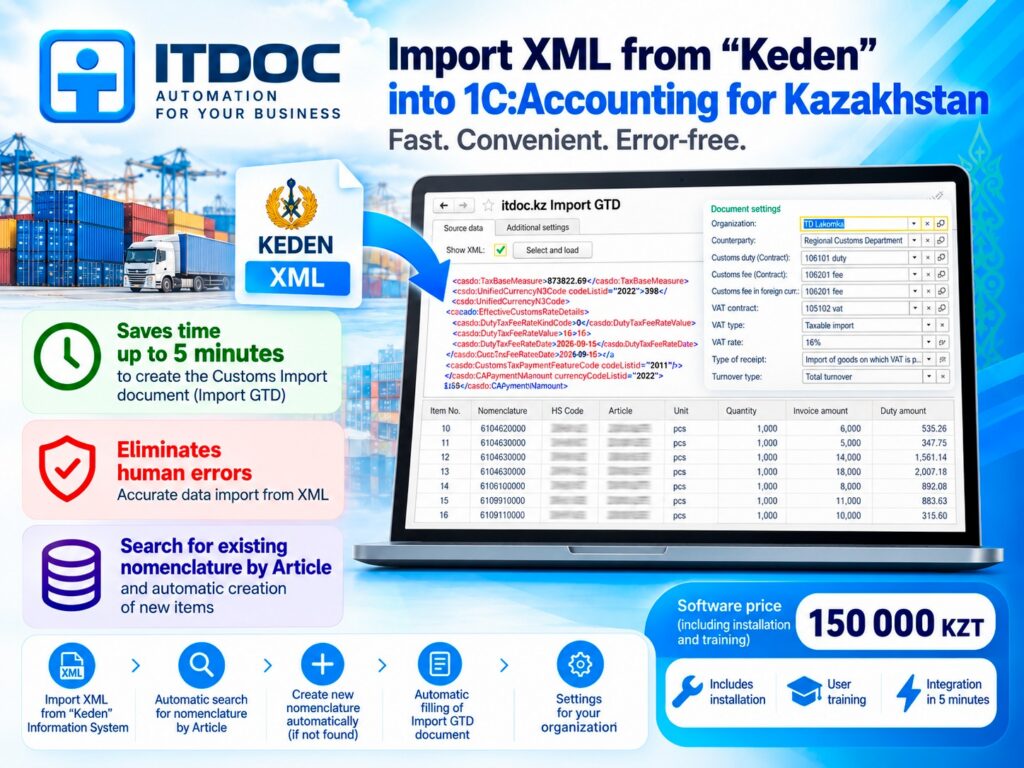
XML KEDEN processing automates data import into 1C:Accounting.
Simply upload the XML file from KEDEN, and the required data will be transferred to 1C automatically.
Forget About Manual Data Entry
When a customs declaration contains a large number of product items, entering everything manually becomes a long and repetitive task.
With XML KEDEN → 1C, the process takes just 5 minutes.
Less manual work.
Fewer errors.
More time for tasks that really matter.
How It Works
1. Get the XML file from KEDEN
Use your company’s electronic customs declaration.
2. Upload the XML file
There is no need to enter each product item manually.
3. Data is transferred to 1C automatically
The solution reads the information from the KEDEN XML file and imports the required data into 1C:Accounting.
4. Check the result
Instead of hours of manual work, you complete a few simple steps and get the result.
What Your Company Gets
- saves your accountant’s time;
- reduces manual data entry;
- lowers the risk of errors;
- speeds up processing of large customs declarations;
- makes regular import operations easier;
- simplifies day-to-day work in 1C.
You Don’t Have to Set It Up on Your Own
Our specialists will help you install and configure the solution, check compatibility with your 1C configuration, and explain how to use it correctly.
We support you throughout the entire setup process to make sure everything works smoothly and without unnecessary complications.
Want to Know If This Solution Is Right for Your Company?
Leave a request and our specialist will contact you, clarify your requirements, and explain how XML KEDEN data import into 1C:Accounting can be automated for your business.